geometry dash editor 2.0 copy remix
Geometry Dash Editor 2.0 Copy Remix: Build Your Own Levels Online
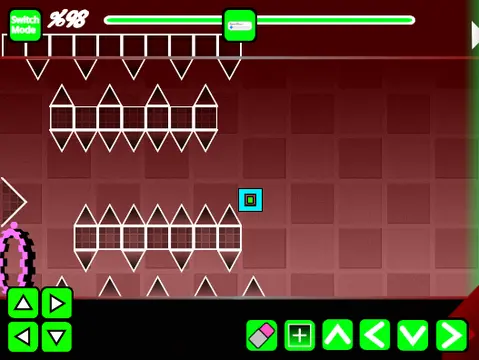
Discover Geometry Dash Editor 2.0 Copy Remix, a powerful and comprehensive level creation tool built for Scratch and online play. This advanced editor offers a feature-rich environment to design, test, and share your own Geometry Dash levels directly in your browser. A critical performance note: the editor can be resource-intensive, so it is highly recommended to use Turbowarp.org for the best experience, with Turbo Mode as a secondary, less effective option.
Complete Level Design Toolkit
The editor replicates core Geometry Dash mechanics, allowing you to place a vast array of objects. Build your level with standard blocks, platforms, slopes, and decorative elements like pulsing chains. Implement gameplay variety with gravity portals, size-altering mini portals, mirror portals for symmetrical challenges, and dual portals for simultaneous control of two icons. You can set speed changes with speed portals and incorporate pads, orbs (including dash orbs), and various dangers like spikes and saws. The editor supports all player forms: Cube, Ship, Ball, UFO, Wave, Robot, and Spider.
Customization and Workflow
Customization is a key strength. You can fully personalize your level by adding your own soundtrack. Simply enter the backdrop tab, remove the default music, and import any track you desire. To save your work, remember to remix the project when you begin a new creation, and use the 'Save' function within the project to preserve your progress.
Intuitive Control Scheme
Controls are divided into intuitive categories. Switch between editing and testing by pressing 'Z' and 'M'. In Player Mode, click to perform all actions (jump, fly, switch gravity). Access a 'no-clip' debug option with 'I' and 'O', and rate completed levels using keys 0-9. In the robust Editor Mode, use '1'/'3' to cycle block menus and '4'/'5' to select specific blocks. The '2' key activates the eraser. Press 'I'/'O' for settings and 'O'/'P' for the debug menu. Place blocks by clicking, rotate them with 'R', and bring up fine-tuning menus with 'R'+'E' (rotation/nudge) or 'F' (triggers). Reset adjustments with 'R'+'O'.
Development & Updates
The editor has seen consistent updates, including version 1.3 which introduced mobile-friendly editing controls, 1.2 that added numeric indicators to the progress bar, and the foundational 1.0 release with all core creation tools. Dive into Geometry Dash Editor 2.0 Copy Remix to unleash your creativity, craft challenging levels, and experience the full cycle of game design.



















































Discuss geometry dash