geometry dash wave v1.1.4 remix
Geometry Dash Wave v1.1.4 Remix: When Visual Deception Becomes Art
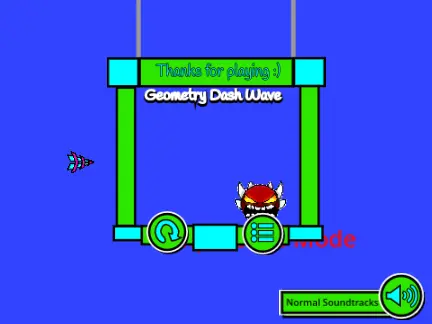
First things first: MINOR SEIZURE WARNING FOR IMPOSSIBLE MODE. The creator isn't messing around here. If you're sensitive to flashing lights, maybe stick to the normal waves. And speaking of warnings – "If the game freezes when you play, and you instantly die, reload the page." Classic Geometry Dash experience right there.
You're a creator focused on building beautiful, playable levels, right? You spend hours in practice sessions targeting one specific difficult section, tweaking timings by milliseconds. This remix? It's a masterclass in visual design for wave gameplay.
Let me tell you about meeting another GD player in real life. Instant connection the moment you find someone IRL who plays Geometry Dash. You start talking wave patterns, demon difficulties, that one impossible section in Bloodbath... and suddenly you're not just two random people, you're part of the same tribe.
The 10-Wave Arsenal
This remix gives you options. Press 1,2,3,4.....9 and 0 to switch between 10 completely different waves before you start. That's not just variety – that's a strategic toolkit. Some waves are tight and precise, others are wide and flowy. Finding one that matches your specific aesthetic or musical taste is part of the challenge.
Controls are straightforward (but deceptively simple):
- Space or mouse to go up/down (creator prefers space bar, for what it's worth)
- Don't touch top/bottom or obstacles – standard GD rules apply
- L key toggles low lag mode at any time (eliminates particles)
- Fullscreen not recommended – it apparently lags a lot
Now here's where the visual processing and deception comes in. Each wave isn't just a different shape – it's a different visual language. Wave 3 might use pulsing colors to indicate rhythm, while Wave 7 uses size changes. Wave 9? Pure pattern recognition with minimal visual cues.
And yes, you can play this with sound off as a pure visual challenge. In fact, I'd argue it's BETTER without sound sometimes. The visual patterns become clearer when you're not distracted by audio cues.
The Keyboard Wars: Cherry MX Edition
Let's talk hardware for a second. The keyboard actuation force debate: Cherry MX Red switches versus Blues. Reds have 45g, perfect for rapid cube jumps. Blues have 60g, better for precise ship control. But for wave gameplay? That's personal preference territory.
What matters more for this remix: consistency. Whether you're using a $20 membrane keyboard or a $300 custom mechanical, your inputs need to be predictable. That's why the creator included the low lag mode toggle – to remove variables.
Speaking of performance tools: ever used Mega Hack v7 or FPS bypass tools? They're game-changers for serious players. But here's the thing – this remix runs in a browser. No mods needed. The optimization is built-in.
⚠️ CRITICAL TIP: If it freezes and you die instantly (happens sometimes, no idea why according to the creator), just reload. Don't rage quit. Reload. The Turbowarp link provided (Turbowarp.org/202395548) often runs smoother than the native Scratch player.
Community-Driven Design
The creator mentions their YouTube channel with a "secret in it" (link provided: https://www.youtube.com/watch?v=dQw4w9WgXcQ – classic move). But more importantly, they thank the community for 1000 plays. That's not just a number – that's validation.
In the Geometry Dash community, community-organized demon runs are where legends are made. People gather (virtually) to attempt the same impossible level, sharing tips, cheering each other on, collectively groaning at 98% deaths.
This remix feels like it was designed FOR those community sessions. The 10 different waves mean 10 different challenges to master. You could organize a mini-tournament: everyone plays Wave 5, highest percentage wins. Then move to Wave 8. And so on.
Building Your Strategy
Approaching this like a strategist planning an attack on a difficult level:
1. Reconnaissance: Try each wave once. Don't try to win, just observe patterns.
2. Weapon selection: Find the wave that matches your natural rhythm. Some people click faster, some slower.
3. Training: Use the low lag mode to learn patterns without visual clutter.
4. Execution: Switch to normal mode, aim for consistency over speed.
Now, about that question: what do you do if community levels won't load? With browser-based games like this, it's usually a cache issue. Clear your browser cache, try a different browser (Chrome tends to work best with Scratch projects), or use the Turbowarp link directly.
And what ARE the most impressive community creations in Geometry Dash? For wave gameplay specifically, it's not always about difficulty. Sometimes it's about creativity. A wave section that tells a story through its movement. One that syncs perfectly with music you'd never expect to work with GD. One that makes you smile even as you fail for the 50th time.
Wave v1.1.4 Remix achieves something special: it's challenging but fair, varied but cohesive, optimized but still feels like a labor of love. When you finally master all 10 waves (including Impossible Mode, if you're brave enough), you'll understand why the community gave it 1000+ plays.
So go ahead. Press L to toggle low lag mode, choose your wave, and remember: nobody reads to the bottom, so if you managed to, then comment "Gib-a-dib." Inside jokes – another beautiful part of the GD community.



















































Discuss geometry dash