geometry dash extreme demon layout
Geometry Dash Extreme Demon Layout: Advanced Scratch Level Editor
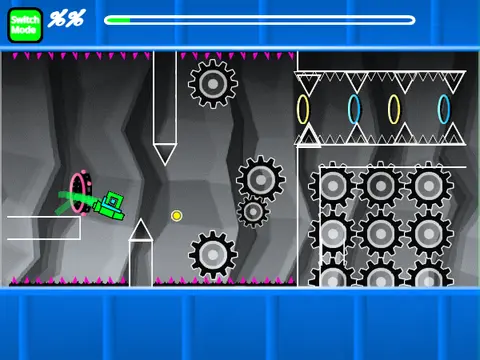
Geometry Dash Extreme Demon Layout is a sophisticated and fully-functional level creation tool built on Scratch, specifically tailored for designing high-difficulty “Extreme Demon” style gameplay. This editor focuses exclusively on crafting the challenging layout and mechanics, providing a pure, unadorned workspace for serious creators. Important Note: This project may cause significant lag. For optimal performance, we strongly advise playing it on TurboWarp.org or enabling Scratch‘s Turbo Mode.
Powerful Editor & Play Controls
The editor replicates a professional Geometry Dash creation environment. Switch between Editor Mode and Play Mode using the `Z` and `M` keys.
- Play Mode: Control your icon by clicking. Press `I` and `O` to toggle a ‘no-clip’ debugging feature. At the end screen, rate the level using keys `0` through `9`.
- Editor Mode: Access a complete toolkit:
- Cycle block menus: `1` / `3`
- Navigate blocks within a menu: `4` / `5`
- Select the eraser tool: `2`
- Place objects: Click
- Rotate objects: `R`
- Precise rotation/nudge menu: `R` + `E`
- Reset rotation/nudge: `R` + `O`
- Open the trigger menu: `F`
- Access settings: `I` / `O`
- Open debug menu: `O` / `P`
Project Management & Features
Customize your level‘s audio by deleting the default backdrop music and adding your own. To save your progress, remix the project initially and save it normally thereafter. This editor’s evolution is detailed in its update log, with versions adding essential Geometry Dash elements: all gameplay modes (cube, ship, ball, UFO, wave, robot, spider), gravity and size portals, jump orbs, speed pads, color triggers, slopes, moving objects, and decorative pulses. Whether you‘re a seasoned level designer or a Scratch coder interested in game mechanics, this Extreme Demon Layout editor provides a robust, free platform to build and test your most challenging creations online.



















































Discuss geometry dash