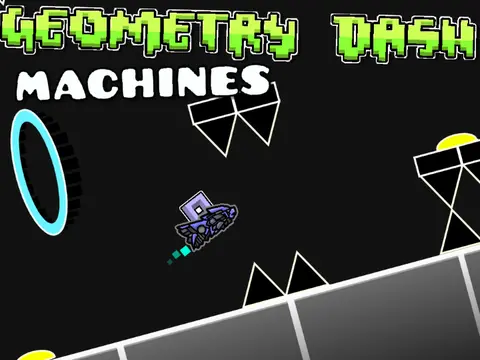
machines - a geometry dash level
Machines: When a Geometry Dash Level Becomes Its Own Beast
Alright, let's break this down step by step. You're someone who only plays official RobTop levels - the polished ones, the balanced ones, the ones that feel... safe. Then you encounter "Machines - A Geometry Dash Level" and suddenly you're in unfamiliar territory.
First things first: the creator gives you a warning right upfront. Actually, multiple warnings. Let's talk about those.
The Warning Labels (Pay Attention!)
⚠ WARNING ⚠ - This game is A RAGE GAME so don't worry if you don't get it the first time.
Translation: You're going to fail. A lot. The creator took 19 attempts to beat it, and it's "WAY HARDER than Easy Shift." If you're on public transportation killing time with mobile GD, maybe have some patience handy.
Second warning: "This game also contains some flashing lights, so if you are epileptic consider this." Important safety notice - the creator cares enough to include this, which says something about their responsibility.
Third warning: "ANY RUDENESS WILL BE REPORTED!! ANY ADVERTISING WILL BE REPORTED!!!" All caps, triple exclamation points. This creator has dealt with comment sections before.
Understanding Basic Controls
So what input methods does Geometry Dash support? The traditional answer: keyboard, mouse, touchscreen, controller. But for this custom level, you're probably using whatever the original game supports.
Here's where the teacher in me wants to emphasize: When you're trying to understand basic controls and complete that first official level (or custom level, in this case), sometimes playing with sound off becomes a visual-only challenge. Can you read the patterns without the audio cues?
Glow effects: pretty lights that often hide deadly traps. The creator mentions "custom artwork" - they didn't use anyone else's assets except @griffpatch (tutorial and some art). That's impressive. Creating original Geometry Dash-style artwork isn't easy.
The Beta Experience
The creator is honest: "This is In BETA version still, because I still need to launch some updates." Future plans include: more skins, better menu, score and highscore tracking. The scrolling speed may augment during levels, and it's "a very short level."
Short but intense. That's the design philosophy here. No padding, no filler - just concentrated challenge.
Music credit: 'Finger Bang' by MDK. Good choice - MDK's tracks have that perfect Geometry Dash energy. Fast-paced, electronic, with clear rhythm sections that sync well with gameplay.
Easter Eggs and Hidden Elements
Are there any Easter eggs or hidden levels in this custom Geometry Dash level? The creator doesn't mention any, but with the beta status and future updates planned, who knows what might get added?
The references show respect: @griffpatch for tutorial and art, RobTop games for the idea and art inspiration. Good creators acknowledge their influences.
Profile link provided: https://scratch.mit.edu/yannick-lesseps - putting your name on your work. That takes confidence.
Why This Level Matters
For players who only stick to official RobTop levels, custom levels like "Machines" represent the lifeblood of the Geometry Dash community. They're where innovation happens, where new styles get tested, where creators learn and grow.
The fact that this is a "remake of the original Geometry Dash Game by RobTop Games" but with custom artwork shows ambition. This isn't just placing blocks in the editor - this is creating assets from scratch.
Screen shake: because stable visuals would be too merciful. Custom levels often play with these effects more aggressively than official ones, testing player tolerance and skill.
Color triggers: rainbow vomit that obscures everything important. Well-made custom levels use these intentionally, not just for decoration but as actual gameplay elements.
Playing Machines: A Step-by-Step Approach
- Read the warnings - seriously, flashing lights are no joke
- Expect failure - 19 attempts for the creator means maybe 50 for you
- Focus on patterns - short level means memorization is possible
- Appreciate the art - custom artwork deserves attention
- Check the profile - see what else the creator has made
Blinking blocks: timing games that feel like Russian roulette. In a well-designed level like this (the creator cares enough to give multiple warnings, so likely designed with care), these elements are placed intentionally, not randomly.
Move triggers: platforms that won't stay still for your jumps. These separate casual players from dedicated ones.
The Rage Game Reality
The creator embraces the "rage game" label. That's refreshing honesty. So many custom levels pretend to be fair when they're actually brutally difficult. This one tells you upfront: you're going to get frustrated.
But here's the thing about rage games - the victory feels sweeter. That first Demon completion: a badge of honor that changes everything. Even if this isn't officially rated Demon difficulty, the experience is similar.
Joining my studio: https://scratch.mit.edu/studios/32139862/ - community building. Creators supporting each other.
The silence after completion: no cheers, just exhausted relief. That's what beating a challenging custom level feels like.
Final Verdict
Should you play "Machines - A Geometry Dash Level"? If you're ready to move beyond official RobTop levels, yes. If you appreciate original artwork, yes. If you can handle some frustration in pursuit of satisfaction, absolutely yes.
Just remember: It's a beta. It's short. It's hard. It has flashing lights. And it represents exactly what makes the Geometry Dash community so vibrant - creators taking the core game and making it their own.
So give it those 19 attempts (or 50, or 100). Feel that rage. Experience that victory. And maybe, just maybe, you'll find yourself exploring more custom levels, joining studios, becoming part of the community that keeps Geometry Dash alive beyond the official content.
Because sometimes, the best Geometry Dash experiences aren't the ones RobTop made - they're the ones inspired by what he made.



















































Discuss geometry dash