geometry dash spider challenge v4
Geometry Dash Spider Challenge V4: Advanced Editor with Save Codes
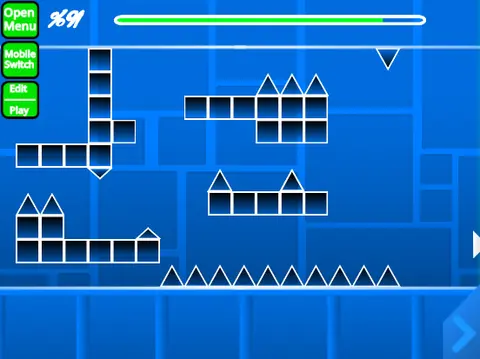
Geometry Dash Spider Challenge V4 represents a significant upgrade, transforming the Scratch-based editor into a more powerful and versatile tool. The headline feature is the addition of Save and Load Codes, allowing you to generate a text code for your level and share it or reload it later, eliminating reliance on project files.
Expanded Toolkit and New Features
V4 massively expands your creative palette. New gameplay elements include breakable blocks, keys, user coins, counters, and colored blocks with glow effects. The trigger system is enhanced with Move, Alpha, and Instant Count triggers, enabling complex animations and mechanics. You also get new objects like teleport portals, 3D objects, thorns, the Swing Copter mode, more monster designs, and fade effects.
Enhanced Controls and Practice Mode
Editor controls are refined. Use Z to pick a block for quick copying, B for the detection menu, and T to rotate objects 45 degrees. Crucially, 9 saves your level to a code, and 0 loads a saved code. In Practice Mode, you can now place checkpoints by pressing Z, making testing difficult sections much easier. General controls remain: switch modes with Z/M, navigate menus with 1/3/4/5, and use I/O for no-clip debugging.
Optimized for Performance on Turbowarp
For the optimal, low-lag experience, it is strongly recommended to play V4 on its dedicated Turbowarp link. Remember to add custom music via the backdrop and start by remixing the project. This version (2.x) builds upon the solid foundation of V3 (1.x), adding critical quality-of-life features and a vast array of new objects, solidifying its position as a top-tier browser-based Geometry Dash creation suite.



















































Discuss geometry dash