geometry dash spam wave v6
Geometry Dash Spam Wave V6: The Advanced Creator
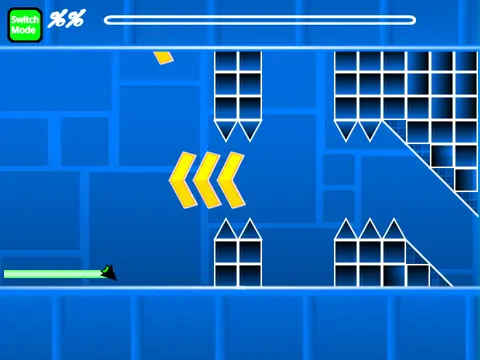
Geometry Dash Spam Wave V6 is the refined successor to V5, offering the same extensive creative and gameplay tools for building and playing Geometry Dash levels directly in your web browser. This version maintains the core philosophy of a standalone, editor-focused experience within the Scratch environment. The creator also highlights a new, separate project called "Geometry Dash Revamped," suggesting a continuous evolution of the game's engine.
Complete Gameplay Package
Jump into the precise, rhythm-based action of Geometry Dash. Master seven distinct game modes: Cube, Ship, Ball, UFO, Wave, Robot, and Spider. Each mode responds to your clicks or key presses differently—holding to fly, tapping to flip gravity, or managing wave-like zigzag movement. Navigate through environments packed with hazards like spikes and spinning saws, use jump orbs and pads, and traverse through portals that change your size, create a mirror copy, or shift the game's speed from Slow to Fastest.
Comprehensive Level Editing Suite
The integrated editor is designed for both beginners and seasoned creators. Toggle between creating and testing with the 'Z' and 'M' keys. The editor is organized into intuitive categories: Blocks, Decorations (pulsing and chain), Portals (gravity, size, mirror, dual), Game Mode portals, Pads, Orbs (including dash orbs), Color Triggers, Slopes, and various Hazards. Switch between item menus using the '1'/'3' and '4'/'5' keys, select the eraser with '2', and rotate placed objects with 'R'. Advanced placement controls (nudge and rotation) and a dedicated trigger menu ('F') provide fine-grained control over your level's design.
Essential Features & Instructions
- Playing the Game: Control your icon by clicking, pressing Space, 'W', or the Up Arrow. The 'no-clip' debug option (toggled with 'I' and 'O') allows for easier testing. Upon completing a level, use the 0-9 number keys to rate it.
- Building Levels: Save your work by remixing the original project—this remix acts as your persistent save file. You can import your own background music by modifying the sounds in the backdrop, allowing for fully customized audio landscapes.
- Performance & Community: The developer strongly recommends using Turbowarp for a significantly smoother experience, especially when working with complex levels, though Scratch's Turbo Mode offers a lesser alternative. For questions and community interaction, players are directed to the project's Scratch studio comments section.
- Update History: V6 builds upon previous versions, incorporating fixes for portal bugs, adding mobile-friendly editor controls, and introducing quality-of-life features like an on-screen progress bar with numeric percentages.
Geometry Dash Spam Wave V6 serves as a powerful, free-to-use platform for anyone wanting to engage with Geometry Dash beyond just playing. It demystifies level creation, providing all the tools needed to construct challenging, music-synced levels and share them with the global Scratch community, all without leaving your browser.



















































Discuss geometry dash