geometry dash level creator v1.2
Geometry Dash Level Creator v1.2: Your First Step into Making Hell
Ever looked at a geometry dash level editor and felt overwhelmed? All those triggers, groups, layers... what if you just want to place a few spikes and make a friend suffer? Enter Geometry Dash Level Creator v1.2. This is about as simple as it gets. The coding and background were made by the creator, while the objects are from RobTop. It's the perfect project for when you have a short break and think, "I want to create and publish my first functional level" but only have 15 minutes to spare.
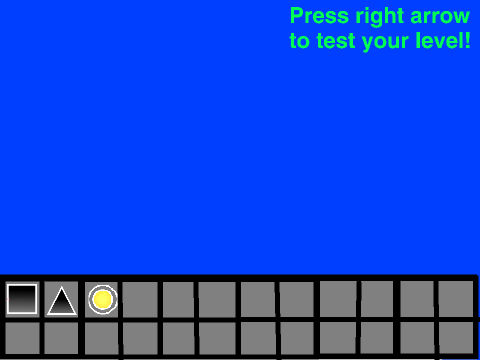
Placing your first block: the beginning of creation. That's the magic moment this tool delivers. The interface is barebones. You click on an object from the palette—a block, a spike, or the newly added jump orb—then press space to place it on the grid. Green flag to reset. That's it. There's no scrolling camera, no song sync, no decorations. It's a digital Etch-A-Sketch for Geometry Dash gameplay. It answers a fundamental question: How comprehensive is the Geometry Dash level editor? Well, the official one is incredibly comprehensive. This one is not. And that's its strength.
The update log tells a short story of passion and iteration: v1.0 released with spikes, blocks, and a testing mode. v1.1 fixed a bug in said testing mode. v1.2 added the Jump Orb. You can feel the creator's focus: "The point isn't to get rated. It's to make a 1-minute level that YOU enjoy playing." This tool embodies that philosophy perfectly. It's for you, for fun, for experimentation.
✏️ How to Use It (It's Super Simple):
- Click on an object (Block, Spike, Jump Orb) in the area on the side to select it.
- Move your mouse to where you want it on the main grid.
- Press the SPACEBAR to place it.
- Press the Green Flag to clear the level and start over.
- Switch to Testing Mode to try navigating your own devilish creation!
This is where many of us start. Testing your first creation: immediate disappointment. You build a tight jump section, test it, and immediately crash because your spacing is all wrong. You learn. You adjust. This tool, in its simplicity, teaches the most important lesson of level design: gameplay vs decoration balance: readability is key. With no decoration at all, your level is 100% pure gameplay. If it's not fun or fair with just grey blocks and pink spikes, adding glow effects won't save it.
Using it feels like being a discoverer. "You won't believe it. I just 'composed' my first 30 seconds of sync," that excited feeling is here, even if your "sync" is just a rhythm of spikes you feel in your head. It's a gateway. After making a few levels here, you might start wondering about the guidelines for publishing levels in the real GD community, or how to add custom music. This project doesn't get you there, but it lights the spark.
So, who is this for? It's for the absolute beginner creator, the person who wants to understand placement and difficulty without any frills. It's a playground. You won't make the next featured level here, but you might make a nasty little obstacle course that makes you smile when you finally beat it. And sometimes, that's enough. Give it a shot, place some spikes, and see what kind of simple, sadistic challenges you can dream up.



















































Discuss geometry dash