updated and upgraded geometry dash levels 1-8 v0.8
Updated and Upgraded Geometry Dash Levels 1-8 v0.8: Enhanced Classic Gameplay
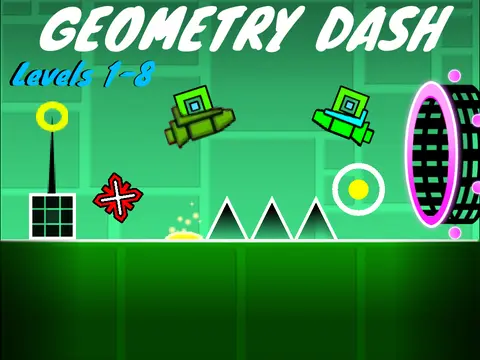
Updated and Upgraded Geometry Dash Levels 1-8 v0.8 delivers a comprehensive recreation and significant enhancement of Geometry Dash's original early levels, featuring extensive customization options, quality improvements, and community-developed features. This browser-based adaptation faithfully recreates levels 1-8 from the classic Geometry Dash while introducing substantial quality-of-life enhancements and customization tools for an optimized gaming experience.
Comprehensive Control Shortcuts and Customization
The game provides an extensive array of keyboard shortcuts for optimized control and real-time customization:
- P: Pause gameplay
- L: Toggle special effects on/off
- F: Enable/disable ghost mode (inspired by @Anti-ettette)
- B: Switch between different backgrounds
- R: Restart current level
- V: Control sound volume on/off
- Z + M: Enter editor mode
- Number keys 1-6: Select different geometry types in editor
- Z + M again: Save changes and return to testing mode
Optimized Performance Recommendations
For optimal performance and visual quality, the developers specifically recommend using Turbowarp (available at https://turbowarp.org/540167533), which significantly reduces lag and provides superior rendering quality. This technical recommendation demonstrates the project's commitment to performance optimization for browser-based gaming and ensures players receive the best possible experience when engaging with these enhanced Geometry Dash levels.
Intuitive Navigation and Control Systems
Players can seamlessly switch between levels using either the intuitive small arrows on the screen interface or the keyboard's left and right arrow keys, with the developers noting that mouse control provides more reliable navigation than keyboard input for this function. Control mechanics adapt dynamically to character mode:
- Cube Mode: Use up arrow, spacebar, W key, or mouse click to jump, with continuous holding enabling sustained jumping
- Ship Mode: Same controls enable flight mechanics, with button release causing controlled descent
Authentic Geometry Dash Mechanics with Enhancements
The game faithfully implements Geometry Dash's core interaction systems while maintaining the original challenge and rhythm:
- Jump Pads: Pink pads provide low jumps, yellow pads medium jumps, blue pads gravity switches
- Jump Orbs: Pink orbs enable low jumps, yellow orbs medium jumps, blue orbs gravity inversion
- Obstacles: Avoid spikes and wall collisions
- Collectibles: Gather coins worth 25 points each
- Objective: Reach the yellow finish line to complete each level
Community-Driven Development and Acknowledgments
This enhanced Geometry Dash experience represents collaborative community development, with specific acknowledgments to @griffpatch and @hoppingicon for foundational projects and scripts, Robtop Games for the original Geometry Dash concept that inspired this adaptation, and @Anti-ettette for the innovative ghost mode implementation idea. The "updated and upgraded" approach exemplifies how community modifications can respectfully extend and enhance established game experiences while preserving the core gameplay mechanics that made Geometry Dash a global phenomenon in rhythm-based platform gaming.



















































Discuss geometry dash