Hyperbolic Geometry
Hyperbolic Geometry: Interactive Non-Euclidean Exploration
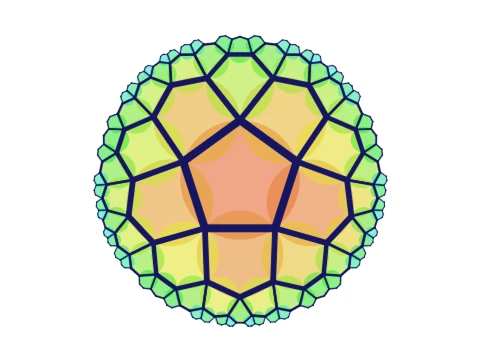
Hyperbolic Geometry offers an interactive mathematical experience that visualizes non-Euclidean geometric principles through customizable hyperbolic plane tilings. This completed project represents extensive mathematical implementation work, allowing players to experiment with hyperbolic space properties through intuitive controls and adjustable parameters.
Interactive Controls & Parameter Customization
Navigate the hyperbolic plane using simple mouse controls: click anywhere to move in that direction within the non-Euclidean space. Customize tiling patterns by pressing the flag icon to adjust N and K parameters, where N controls the number of edges per polygon and K determines how many polygons meet at each vertex. The system maintains mathematical validity by automatically resetting invalid parameter combinations that cannot produce functional hyperbolic tilings.
For expanded visualization capabilities, press Z to increase the maximum number of polygons displayed, enabling observation of more complex tiling arrangements and patterns. This parameter adjustment system allows users to explore the mathematical relationships between polygon configuration and complete hyperbolic plane coverage.
Technical Implementation & Mathematical Foundations
The core algorithm generates hyperbolic plane tilings by copying an initial polygon and reflecting it repeatedly across its edges. Development utilized specialized mathematical resources including the Poincaré tiling calculator available at www.malinc.se/noneuclidean/en/poincaretiling.php for determining appropriate initial polygon dimensions. Comprehensive geometry textbooks from mphitchman.com provided theoretical foundations for understanding reflections, translations, and rotations within the Poincaré disk model of hyperbolic geometry.
Performance Optimized Versions & Educational Value
Enhanced performance versions are accessible through external platforms including a Turbowarp implementation at https://turbowarp.org/852092751?turbo&hqpen offering improved rendering quality and processing efficiency. An alternative Shadertoy version at www.shadertoy.com/view/ctt3z8 provides different visualization approaches for comparative study.
This educational tool effectively bridges abstract mathematical theory with hands-on experimentation, allowing users to visualize hyperbolic geometric principles through direct manipulation of tiling parameters and spatial navigation within non-Euclidean environments. The project serves both educational and exploratory purposes for mathematics enthusiasts and geometry students alike.

















































Discuss geometry dash