Geometry Dash Menu
Geometry Dash Menu: An Interactive Interface Showcase
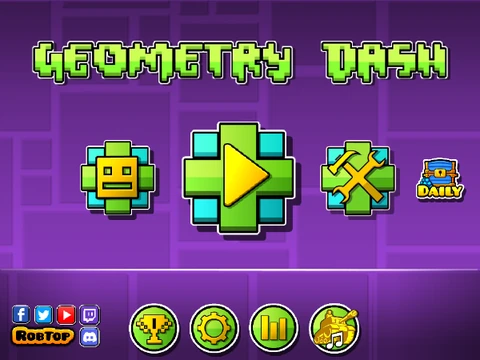
Geometry Dash Menu is a unique project that focuses entirely on recreating and presenting the iconic user interface of Geometry Dash. This is not a traditional gameplay experience but rather an interactive simulation and visual showcase of the game's menus, designed for fans who appreciate the aesthetic and functional design of the official game's front end.
Featured UI Elements & Interaction
The project meticulously replicates key components of the Geometry Dash main screen. You can interact with primary buttons like Icon Kits, Main Levels, and Online/More sections, all positioned alongside the recognizable Geometry Dash logo. The background features the classic GD ground and decorative elements. Visual feedback is implemented, with buttons displaying hover effects when the mouse cursor passes over them. The interface also includes the bottom row of utility buttons and a partially functional Settings menu that pops up with smooth animation.
Development & Technical Details
This showcase has evolved through several versions (v1 to v1.4.1), with the creator adding polish and functionality over time. Key technical implementations include delta time for consistent animation speed, 16:9 aspect ratio support for proper scaling, and optimization that reduced the project from 7 sprites to a more efficient 4. The creator utilized textures from @theblacktiger7 and has plans for future updates, such as making the menu buttons fully functional and expanding the settings panel. The project also exists as a downloadable HTML-packaged version, offering flexibility in how it is viewed and shared.
Ideal for viewers interested in game UI design, Scratch programming showcases, or fans wanting to navigate a familiar menu, Geometry Dash Menu serves as a testament to detailed recreation and interface design within the Scratch environment.



















































Discuss geometry dash